
How to Map Local Codes to Standard Terminologies Using MT2
What this article covers: How organizations use the West Coast Informatics Mapping Tool 2.0 (MT2) to normalize proprietary or local code systems to standard healthcare terminologies such as SNOMEDCT, LOINC, ICD10CM, and RXNORM, using a structured, repeatable mapping pipeline backed by a live terminology server.
What Are Local Codes in Healthcare?
Local codes are proprietary or system-specific identifiers that organizations use to record clinical or operational data within their own systems. They are created and maintained locally, outside of any recognized standard terminology, and they vary widely in form and structure.
The West Coast Informatics Mapping Tool 2.0 (MT2) is built to address exactly this problem, providing a structured pipeline for normalizing local codes to standard terminologies. But to understand why that matters, it helps to understand where local codes come from.
A laboratory might record specimen types with internal numeric identifiers like "LAB-003" or "SPEC-14." A clinic might use abbreviations defined by a legacy EHR vendor, such as "PROC-77" or "DX-CHF." A payer might track procedures through a custom crosswalk built years ago by a contractor who is no longer around. A hospital system might have accumulated dozens of overlapping local code sets across departments that were never reconciled with each other.
These codes work perfectly within their native system. Outside of it, they are opaque. And the longer they remain in use, the more fragile they become. Local codes carry meaning that lives in institutional memory, not in a formal definition. As staff turn over, systems change, and workflows evolve, the original intent behind a code can quietly shift or simply be forgotten. What "PROC-77" meant when it was created may not be what it means five years later. The code persists. The meaning drifts.
Why Must Local Codes Be Normalized?
Because local codes carry no portable meaning, every system that receives data encoded with them must maintain its own translation layer. That lookup table rarely travels with the data, and the burden of interpretation falls entirely on the consumer.
A health information exchange maps the local codes before querying. A research repository flags records as uncategorized until a reviewer resolves the source vocabulary. An analytics platform silently drops rows it cannot classify, producing subtly wrong counts with no visible error. Each integration point reinvents the same translation work. The local codes never become standard codes. They just accumulate more bespoke bridges between them.
MT2 solves this by providing a structured pipeline for mapping local codes to authoritative standard terminologies, resolving the translation problem once at the source rather than delegating it to every downstream consumer.
Why Local Code Normalization Is Required for True FHIR Compliance
FHIR alone doesn’t solve interoperability. A FHIR resource that carries a local code may validate structurally, passing schema checks and conformance tests, but it fails semantically. The receiving system has no way to interpret what the code means without a separate translation layer, and that layer is not part of the FHIR specification. It is an additional burden the consumer must build and maintain on their own.
This distinction matters because structural compliance is often mistaken for meaningful exchange. An organization can be technically FHIR-compliant while sending data that no receiving system can actually use. The resource arrives. It passes validation. And then it sits, unsearchable and unactionable, until someone resolves the local code on the other end.
Normalization to a standard terminology before data enters a FHIR exchange is what closes that gap. When a local code has been mapped to a recognized SNOMEDCT, LOINC, or ICD10CM concept through MT2, the FHIR resource carries a code that any conforming system can query, aggregate, and act on natively. The exchange becomes meaningful rather than just technically compliant.
How MT2 Normalizes Local Codes: A Six-Step Pipeline
Using MT2 to normalize a local code system to a standard terminology follows a clear, repeatable sequence:
Step 1: Load the local code system. MT2 accepts proprietary or legacy code sets as source vocabularies without reformatting, making them immediately available for mapping against any connected standard terminology.
Step 2: Build the initial map in bulk. MT2's bulk mapping capability allows teams to create mappings across hundreds or thousands of local codes in a single session, with suggested target concepts pulled from the live terminology server to accelerate the process.
Step 3: Refine individual maps. For concepts that require more nuance, MT2 supports multi-group maps, structured rules, and advice fields that capture the full complexity of a mapping decision in a single auditable record.
Step 4: Review, QA, and audit. MT2's table view supports structured side-by-side review with flags, approvals, and a complete history of every mapping decision, all without leaving the tool.
Step 5: Publish and deliver normalized output. Once published, normalized maps ensure that data leaving the source system carries standard terminology codes that any conforming downstream system can interpret immediately, and stays accurate as terminology releases evolve.
Step 6: Bulk edit when standards or guidance change. When updated guidance deprecates a code across many maps at once, MT2 lets teams identify all affected records, apply the correction in a single action, and write the updates back to the live terminology server immediately.
Step 1: Loading a Local Code System into MT2
The first step is loading the proprietary code set into MT2 as the source vocabulary. MT2 treats local code systems as first-class source terminologies, the same way it handles SNOMEDCT or ICD10CM. No reformatting or preprocessing is required. The local codes are ingested as-is, preserving the structure the source system uses.
Once loaded, the full code set is visible in MT2's table view, where each record shows the source concept alongside its current mapping status, target concept, and any notes or rules attached to the mapping. The table view is where most of the work happens, giving reviewers a clear picture of the entire map at a glance. From this point forward, every mapping action is performed against the current published release of the target standard through MT2's live terminology server integration, supporting Snowstorm out of the box.
Step 2: Building the Initial Map in Bulk
With the source vocabulary loaded and the target terminology connected through the live server, teams begin mapping. For organizations with hundreds or thousands of local codes, building the map one record at a time is not operationally viable. MT2's bulk mapping capability allows teams to create mappings across the full local code set efficiently from the start.
MT2 surfaces suggested target concepts based on semantic matching against the live terminology, so reviewers are making decisions rather than manually searching through hundreds of thousands of active concepts. Because those suggestions come from the live server rather than a static export, every suggested concept is confirmed active in the current release. Rules and patterns can be applied in batches, accelerating the initial build without sacrificing accuracy. The result is a complete draft map covering the full local code set, ready for individual review and refinement.
Step 3: Refining Individual Maps
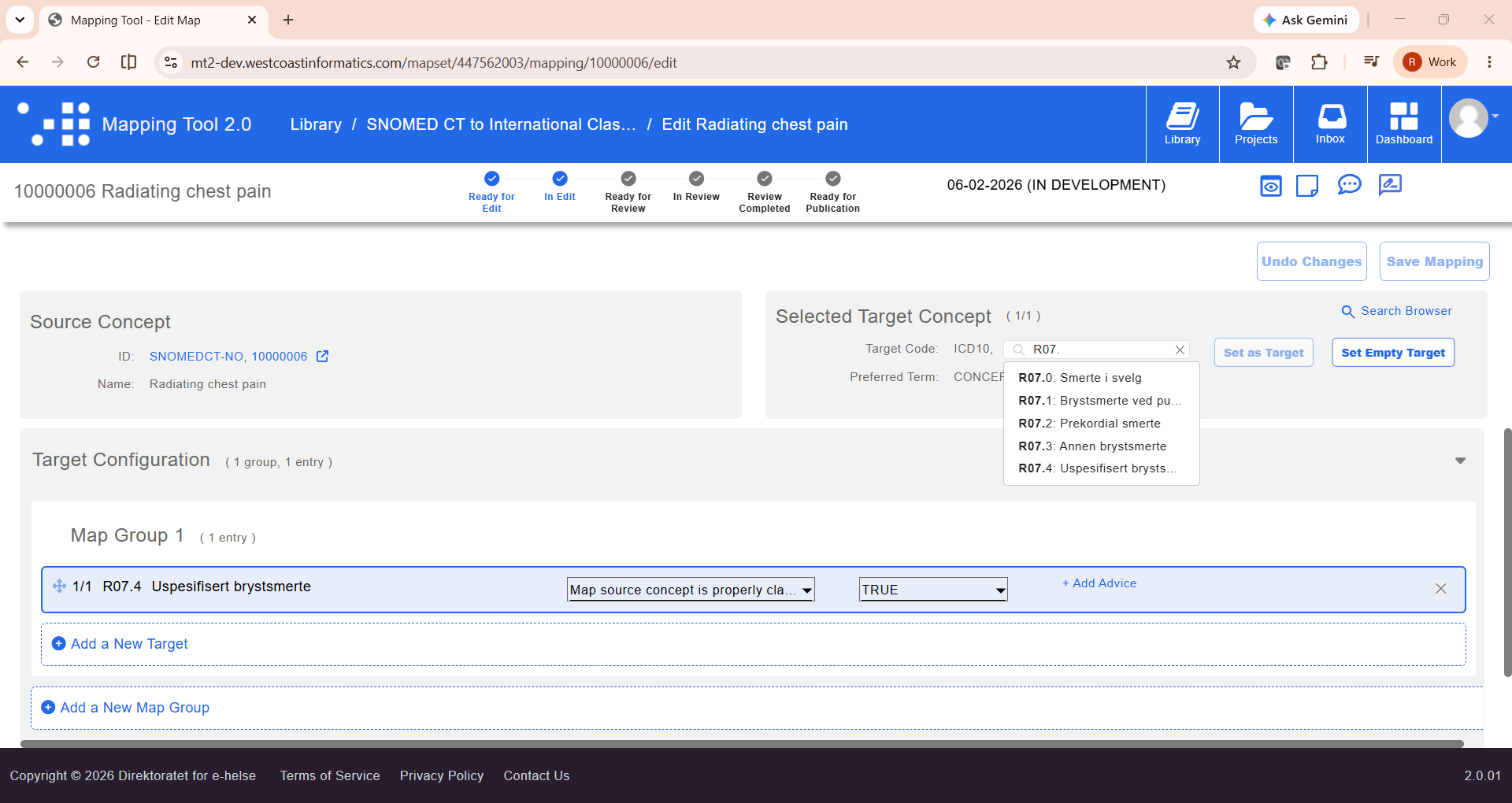
With the bulk map in place, teams move into individual record editing to handle concepts that require more nuance. MT2 gives mappers the full context for a single concept, including the source code and description, target concept pulled from the live terminology, and tools for adding map groups, rules, and advice.
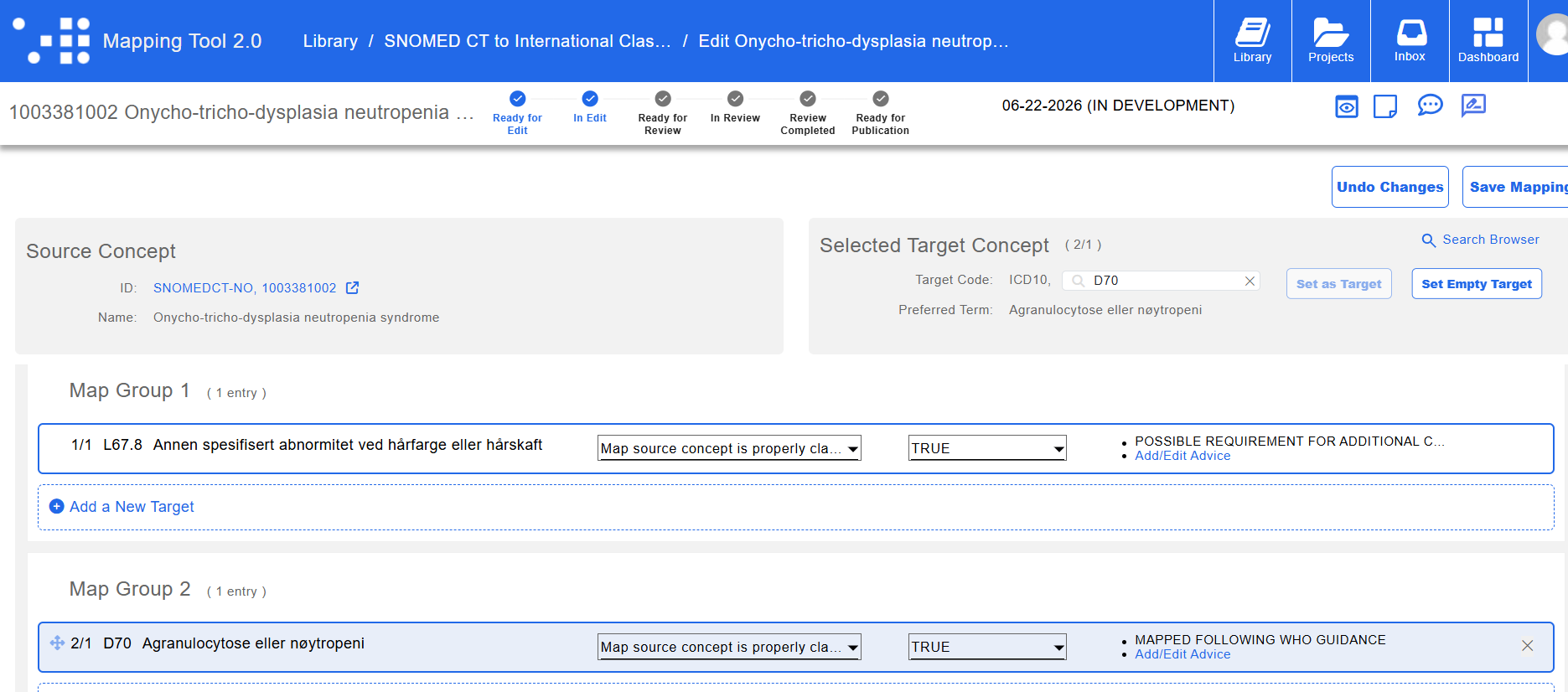
Map groups are an important capability here. Real-world clinical concepts do not always resolve to a single target code. A concept like Bacterial sepsis may require a primary target for the condition itself and a second group covering a more specific manifestation or complication. MT2 supports this directly, allowing mappers to add a second group to a record, set the appropriate target code, and attach structured advice that tells receiving systems how to apply the mapping.
This kind of nuance is what gets lost when mapping is done in a spreadsheet. A flat file can hold a source and a target, but it cannot hold a multi-group map with rules, advice, and a clear audit trail of who made each decision and why.
Step 4: Review, QA, and the Audit Trail
Once mapping is complete, MT2's table view supports structured review. Reviewers examine mappings side by side, checking for quality, consistency, and edge cases across the full set. Flags, updates, and approvals happen directly within MT2.
Nothing leaves the tool for external review. No exports to spreadsheets, no emailed files, no version reconciliation when two reviewers edit separate copies. Every decision is captured in MT2, and the map maintains a clear, auditable history from first draft through final approval.
For organizations operating in regulated environments or subject to mapping audits, this history is not optional. MT2 makes it automatic.
Step 5: Publish and Deliver Normalized Output
When the map is approved and active, data leaving the source system carries standard terminology codes rather than local ones. A record that originated with a local code arrives at its destination carrying the corresponding SNOMEDCT or ICD10CM concept. The local code remains intact internally for workflows that depend on it. Externally, the data is immediately interpretable by any conforming system.
The health information exchange does not need a translation layer. The research repository does not flag the record as uncategorized. The analytics platform does not drop the row. The normalization happened once, at the source boundary, and every downstream consumer inherits the benefit automatically.
And when the next terminology release arrives, MT2 flags the affected maps. The team reconciles them in bulk. The server reflects the updates. The downstream systems stay current without any action on their part.
Step 6: Bulk Editing When Standards or Guidance Change
Individual record editing handles precision work. Bulk editing handles the operational reality that standard terminologies and clinical guidance change, and those changes often affect many maps at once. This is where MT2's live terminology server integration pays its most visible dividend.
Consider a scenario where updated guidance indicates that a specific ICD10CM code should no longer be used in favor of a more precise alternative. Without bulk editing, a team must identify every map in the set that points to the deprecated code and update each one individually. In a large map set, that is hours of work with significant risk of missing records.
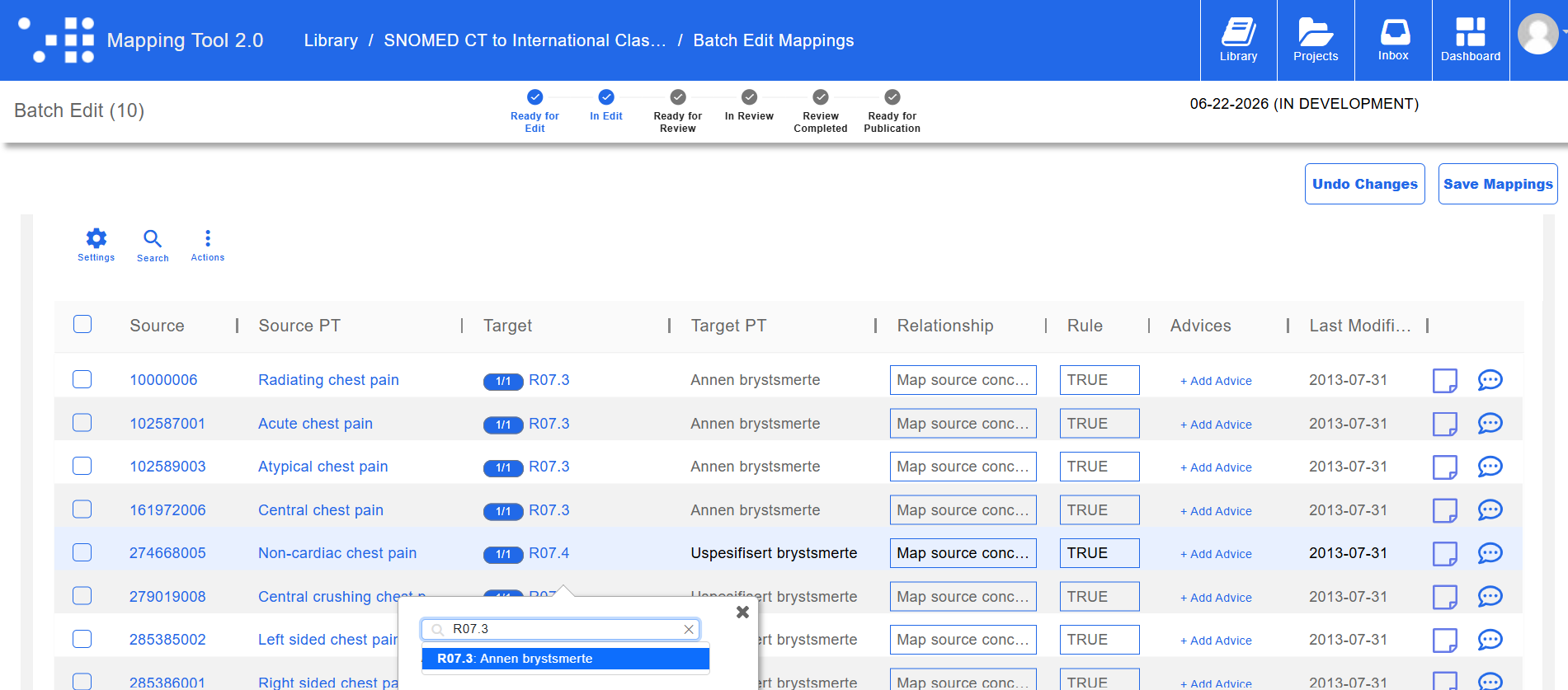
In MT2, the process is a matter of minutes. A team searches for the target code in question across the full map set, selects all affected records using the check-all control, and opens the batch edit interface. From there, the first record is updated to the correct target code. That corrected target can then be copied and applied to all other selected records in a single action. When the team saves, every affected map is updated simultaneously and written back to the live terminology server.
That last point matters. The changes do not sit in a local file waiting to be exported and imported somewhere else. They are committed to the terminology server directly, which means every system connected to that server reflects the updated maps immediately. There is no distribution step, no file transfer, no risk of a consuming system running against a stale version of the map. The map that was published in Step 5 stays accurate without anyone downstream having to do anything at all.
Why MT2's Live Terminology Server Integration Is the Foundation
Most mapping tools maintain maps as separate files, disconnected from the terminology content they reference. MT2 is architecturally different. Maps created and edited in MT2 are stored directly in the terminology server, making the server the single source of truth for both the terminology content and the maps built against it.
This has a specific and important consequence: changes flow in both directions, immediately. When a concept is retired or replaced in the terminology server, MT2 sees it instantly. There is no sync step, no export and re-import, no lag between what the server knows and what MT2 is working from. Equally, when a mapping is updated in MT2 and saved, that change is committed to the terminology server immediately. Every system connected to that server inherits the updated map without any additional action.
This also means that maps stored in the terminology server carry all the operational benefits that come with that architecture. Full version history, controlled access, audit trails, and a single authoritative record that every connected system reads from. The map is not a file someone manages. It is a living artifact maintained in the same infrastructure as the standards it connects.
Putting It Together
Local codes are not going away. The systems that depend on them are too embedded, and the workflows too entrenched, to simply replace them. What MT2 makes possible is something more practical: keeping local codes where they work while ensuring that the data they describe speaks a language every connected system understands. For organizations operating under FHIR-based exchange requirements, this is not optional. FHIR structural compliance alone is not enough. Data that carries unresolved local codes passes validation and fails in practice. Stored in a live terminology server, maintained through a structured pipeline, and updated in bulk when standards or guidance change, maps built in MT2 ensure that FHIR exchange is not just technically compliant but semantically meaningful, accurately and consistently, release after release.
Experience MT2 in Action
Watch an MT2 Walkthrough. See the full pipeline in action in our MT2 demonstration video.
Request a Demo. Ready to see how MT2 handles your specific local code system? Request a personalized demo and visit www.westcoastinformatics.com to learn more.
See MT2 Live at SNOMED Expo 2026. We are presenting MT2 in a dedicated session in Sydney this October. Reach out to schedule a live consultation with our informatics experts and discuss your organization's data goals.